Apple Business Connect is the free Apple tool that lets you control how your salon, spa or restaurant appears in Apple Maps, and it is easy to forget. Many owners spend hours on their Google profile and never claim their Apple listing, even though iPhone users ask Siri for directions, tap addresses in Messages and search in Apple Maps every day. If your Apple listing shows old hours, no photos or the wrong phone number, those clients go somewhere else.
Apple has recently brought Business Connect together with its other business tools under one name, Apple Business. The Maps features owners care about are still there: your place card, photos, hours, action buttons, promotions and insights. This guide explains what changed, why Apple Maps matters for salons, and nine steps to claim and complete your listing, plus Showcases, insights, ads on Apple Maps and a simple monthly routine.
In this article
- What Apple Business Connect is now
- Why Apple Maps matters for salons
- Step 1: Sign in with the right Apple Account
- Step 2: Find or add your location
- Step 3: Confirm you are authorized
- Step 4: Complete your place card
- Step 5: Add strong photos and your logo
- Step 6: Add a Custom Action for booking
- Step 7: Publish Showcases
- Step 8: Read your insights
- Step 9: Keep Apple Maps in sync with Google and Yelp
- Ads on Apple Maps
- Branded Mail and Tap to Pay branding
- Apple Maps for restaurants, bakeries and cafés
- A checklist before you call it done
- Common Apple Maps mistakes
- A monthly Apple Maps routine
- Does Apple Maps help Google ranking?
- Apple Maps for salons with several locations
- How Dreamer helps
- Frequently asked questions
What Apple Business Connect is now
Apple's own user guide now says "Apple Business Connect is now Apple Business". Apple Business combines what was previously Apple Business Manager, Apple Business Essentials and Apple Business Connect in one place, at business.apple.com. For a salon owner, the part that matters is the Maps side: claiming your location and controlling how it appears.
On Apple's Grow your business page, the customer-facing tools are listed as:
- Place cards: your business information on Apple Maps.
- Photos: a curated gallery of your storefront, work and atmosphere.
- Showcases: promotions, seasonal items and events on your place card.
- Custom Actions: buttons to book, order or schedule from the place card.
- Insights: how customers search for you and interact with your place card.
- Branded Mail and Tap to Pay on iPhone branding: your name and logo in customers' inboxes and during payments.
- Ads on Apple Maps: paid placement for businesses in the United States and Canada.
People still search for "Apple Business Connect", so this guide uses both names.
Why Apple Maps matters for salons
- Apple Maps is the default map on iPhone. When a client taps an address or asks Siri "find a nail salon near me", Apple Maps often answers.
- It does not use your Google profile. Your Google hours, photos and booking link do not automatically appear on Apple Maps.
- Claimed listings get more attention. Apple says claimed businesses get 30 percent more views.
- Clients act directly from the place card: call, get directions, visit the website or book.
If you have already worked on your Google profile, adding Apple Maps is one of the fastest ways to reach more nearby clients.
Step 1: Sign in with the right Apple Account
Go to business.apple.com and sign in. Use an Apple Account that belongs to the business owner or a business email you control, not a technician's personal account. If someone leaves the salon, you do not want your Maps listing to leave with them.
Step 2: Find or add your location
Search for your salon. If Apple Maps already lists it, claim it. If not, add a new location with your exact business name, address and phone number. Use the same name that appears on your sign and your Google profile.
Step 3: Confirm you are authorized
Apple asks you to confirm that you are authorized to manage the business. Follow the steps Apple shows at the time and keep your business phone line and documents, such as your business license, handy. Make sure the name and address on your documents match the listing.
Step 4: Complete your place card
Apple's place card covers the details clients look for. Fill in every part:
| Section | What to add for a salon |
|---|---|
| Business info | Exact business name, address with suite number, category |
| About | Two or three sentences about your services, style and languages spoken |
| Hours | Regular hours plus holiday and seasonal hours |
| Contact | Phone number, email address and website |
| Photos and logo | Storefront, interior, stations, team at work, real nail sets, logo |
| Good to know | Payment types accepted, parking, Wi-Fi, accessibility details |
Write the About section in plain language: "Family-owned nail salon in Midtown offering structured gel, dip powder, nail art and spa pedicures. We speak English and Vietnamese. Walk-ins welcome on weekdays."
About section examples for different businesses
The About text should answer "what do you do, for whom, and why choose you" in a few lines. Examples you can adapt:
- Nail salon: "Bright, family-run nail salon near the station. Gel, dip, acrylic, nail art and spa pedicures, with new files for every client. English, Vietnamese and Spanish spoken."
- Lash studio: "Private lash studio for classic, hybrid and volume extensions, lash lifts and brow lamination. Appointments only, with patch tests available for first visits."
- Day spa: "Calm day spa offering massage, facials and body treatments in private rooms. Couples suites and gift cards available."
- Bakery: "Vietnamese-French bakery baking banh mi bread, croissants and custom cakes daily. Order cakes 48 hours ahead."
Avoid claims you cannot prove, such as "the best in the city", and do not stuff the text with keywords. Clear facts persuade better.
What a client sees, step by step
Picture a client on an iPhone who asks for a nail salon nearby. Your place card appears with your name, rating information, distance and opening status. One tap shows your photos, hours, phone, website and the booking button. If the photos look fresh, the hours say "Open" and the button opens a simple booking page, that client can be booked in under a minute without ever calling. Every field you complete removes one reason to pick the salon next door.
Step 5: Add strong photos and your logo
Photos are the first thing many clients notice. Upload:
- The storefront, so clients recognize the entrance.
- The interior and stations.
- The pedicure area.
- Close-ups of real sets your team has done.
- Your logo, so the brand is recognizable.
Use bright, sharp, honest photos. Our guide on how to photograph nails shows how to take them with a phone. Update the gallery every season.
Step 6: Add a Custom Action for booking
Custom Actions add buttons to your place card so clients can book appointments, place orders or make reservations in one tap. Apple says action links increase clickthrough rates by 31 percent across website, call and action buttons.
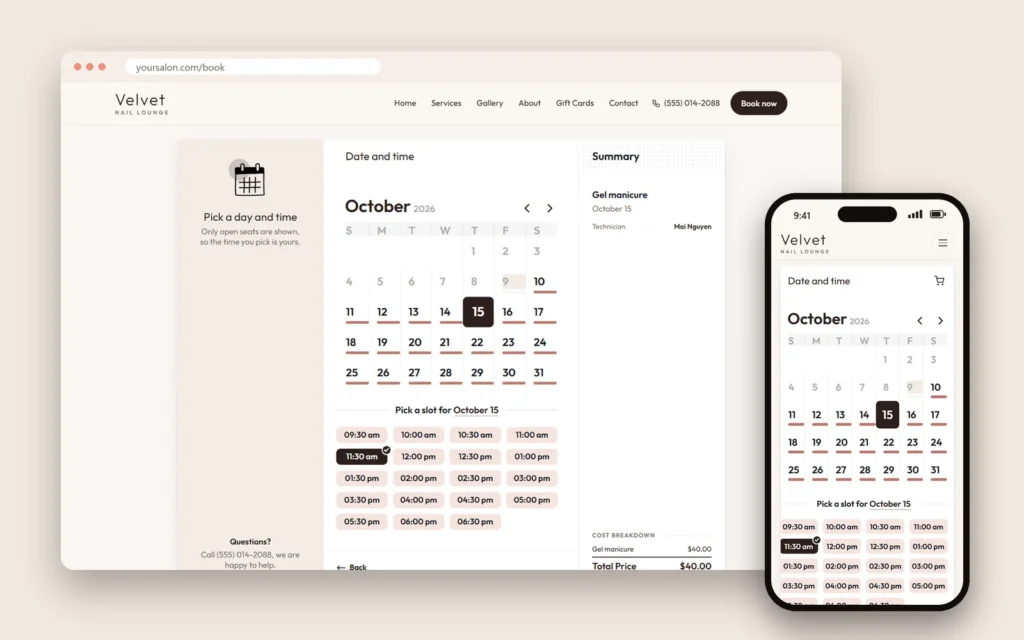
For a salon, the most useful action is a booking link that opens your online booking page. Make sure the link leads straight to booking, not to your home page. Dreamer builds booking websites for salons that work well behind a Custom Action: clients pick a service, a technician and a time, and receive an email confirmation.
Step 7: Publish Showcases
Showcases let you highlight seasonal items, special offers and events on your place card, with an optional call-to-action button. Ideas for salons:
- Seasonal collection: "Fall colors are here: burgundy, olive and caramel gel."
- Gift certificates: before Valentine's Day, Mother's Day and the December holidays.
- Weekday special: "Free paraffin dip with any spa pedicure, Monday to Thursday."
- Event: a grand opening, a nail art class or a charity day.
- New service: structured gel manicures or a new pedicure menu.
Keep Showcases current. An expired offer looks neglected. Our nail salon promotion ideas and nail salon holiday marketing guides have offers that fit.
Step 8: Read your insights
Apple Business shows insights about how customers find and interact with your place card, Showcases and Custom Actions. Apple groups them as:
- Search: how customers search for you.
- Interactions: what makes them tap, call, get directions or book.
- Benchmarks: how you compare with similar businesses.
Check insights monthly. If many people view your place card but few tap the booking button, improve your photos and make sure the booking link works on phones.
Step 9: Keep Apple Maps in sync with Google and Yelp
Clients notice when Apple Maps says you close at 6 and Google says 7. Whenever something changes, update everywhere on the same day:
- Hours and holiday hours.
- Phone number and website.
- Address, suite number and pin location.
- Photos after a renovation.
- Booking link.
Consistent information across platforms also supports your work to rank higher on Google Maps and keeps your Yelp page trustworthy.
Ads on Apple Maps
Apple now offers ads on Apple Maps for businesses in the United States and Canada. Ads appear when people search for nearby businesses, and clients can call or get directions right from the ad. Apple says you control the cost and can start or stop campaigns at any time; at the time of writing, Apple advertises a first-campaign credit with eligibility limits and terms.
Should a salon try it? Only after the free basics are done: a complete place card, real photos, a booking action and accurate hours. Then test with a small budget for a month or two, track calls, directions and bookings, and compare the cost per new client with Google Ads. Our guide to Google Ads for nail salons explains how to judge paid campaigns.
Branded Mail and Tap to Pay branding
Two newer Apple Business features can help a salon look more professional:
- Branded Mail: your business name and logo appear in emails to customers in Apple's Mail app, so appointment confirmations and newsletters are easier to recognize.
- Tap to Pay on iPhone: if you accept payments with an iPhone, your logo and company name can appear during payments and on digital receipts in Wallet.
These are optional. They matter most for salons that send regular emails or take payments on iPhones. Our guide to nail salon email marketing explains how to build an email list that clients welcome.
Apple Maps for restaurants, bakeries and cafés
The same steps apply to food businesses, with a few extras:
- Use Custom Actions for online ordering or reservations.
- Post Showcases for seasonal dishes, holiday pre-orders and catering.
- Keep "Good to know" details such as outdoor seating, parking and payment types current.
- Add photos of popular dishes, the counter and the dining room.
Our guide to local SEO for restaurants covers the rest of a restaurant's local presence.
A checklist before you call it done
Before you consider the listing finished, check that:
- The business name matches your sign exactly.
- The address includes the suite number and the pin sits on your entrance.
- The phone number rings at the salon, not a personal cell.
- Regular hours are correct and the next holiday's hours are already set.
- The website link opens your real site, on a phone, quickly.
- The booking action opens the booking page, not the home page.
- At least ten real photos are uploaded, including the storefront.
- The About text is short, clear and free of keyword lists.
- Payment types, parking and accessibility details are filled in.
- The same details appear on Google, Yelp and Facebook.
Ask a friend with an iPhone to search for the salon and tell you what they see. A fresh pair of eyes catches mistakes owners miss.
Common Apple Maps mistakes
- Never claiming the listing, so Apple shows outdated information.
- Using a personal Apple Account that leaves with an employee.
- Different names or phone numbers on Apple Maps and Google.
- No photos, or only a logo.
- A booking button that opens the home page instead of the booking page.
- Expired Showcases left on the place card.
- Forgetting holiday hours.
A monthly Apple Maps routine
| Task | How often |
|---|---|
| Check hours, phone, website and booking link | Monthly and before holidays |
| Add new photos of work and the salon | Monthly or each season |
| Publish or update a Showcase | When you have an offer, event or new service |
| Read insights: searches, interactions, benchmarks | Monthly |
| Compare details with Google, Yelp and Facebook | Monthly |
This takes about fifteen to thirty minutes a month for most salons.
Does Apple Maps help Google ranking?
Apple Maps and Google Maps are separate systems. Your Apple place card does not directly change your Google ranking. But a consistent presence across major platforms makes your business information more reliable everywhere, and it reaches clients who never open Google Maps. Think of Apple Maps as another front door, not a ranking trick.
Apple Maps for salons with several locations
If you run more than one salon, create a place card for each physical location, with its own address, phone number, hours and photos. Apple says to create and customize a place card for each of your business's physical locations. Share brand-wide Showcases across locations when they apply to all, and post local events only on the location that hosts them. If you manage many locations, Apple also lists vetted partners who can help manage brands and locations.
How Dreamer helps
Dreamer's Social Marketing service creates or claims your Apple Maps and Yelp listings, makes your name, address, phone, hours and website match across Google, Apple Maps, Yelp and Facebook, and keeps them current. If you need a booking page for the Custom Action button, our website design team builds fast salon websites with online booking.
Frequently asked questions
Is Apple Business Connect still available?
Apple Business Connect is now part of Apple Business, which combines Apple's business tools at business.apple.com. The Maps features, such as place cards, photos, Showcases, Custom Actions and insights, are part of Apple Business.
Is Apple Business Connect free?
Claiming and managing your place card is free. Ads on Apple Maps are paid, and some other Apple Business services have their own pricing.
Does Apple Maps use my Google Business Profile?
No. Apple Maps does not use your Google profile, so you need to manage your Apple listing separately.
Can I add a booking button to Apple Maps?
Yes. Custom Actions let clients book appointments, place orders or make reservations from your place card.
How often should I update my Apple Maps listing?
Check it monthly, before every holiday and whenever your hours, phone, address or booking link change.
Should my salon advertise on Apple Maps?
Only after your free place card is complete. Then test a small budget, track calls, directions and bookings, and compare with your other advertising.
Apple Business Connect, now part of Apple Business, is one of the simplest ways for a salon to reach more nearby clients. Claim your place card, fill in every detail, add real photos and a booking action, keep Showcases fresh and check insights monthly. It takes an afternoon to set up and a few minutes a month to maintain, and it makes sure every iPhone user who searches nearby can find your door.