The best booking app for nail salons is not the one with the longest feature list. It is the one that books a gel fill with a nail art add-on for the right technician, blocks the right amount of time, handles walk-ins without chaos and makes booking feel easy for a client standing in line for coffee. Generic appointment apps often stumble on exactly those details, because nail services are short, varied and full of add-ons.
This guide explains what makes a booking app work for a nail salon, the twelve features worth paying for, the test bookings to run before you commit, how booking apps connect to Google, what they really cost and when your own booking website is the better choice. It does not crown a single winner, because the best app for a six-chair walk-in salon is not the best app for a solo nail artist with a waitlist.
In this article
- What makes nail salons different
- The twelve features that matter for nails
- Nice-to-have features
- Run five test bookings before you choose
- How booking apps connect to Google
- What booking apps really cost
- Marketplace apps vs your own booking page
- When a booking website beats an app
- Booking apps for walk-in heavy salons
- Booking apps for solo nail artists
- Setting up your booking app well
- What clients expect from a nail salon booking page
- Peak days: holidays, prom and weddings
- Language, accessibility and privacy
- Introduce online booking to your regulars
- A checklist before you sign up
- Train the team on day one
- Measure whether the booking app works
- Common mistakes
- Frequently asked questions
What makes nail salons different
Nail salons have booking needs that many generic apps do not handle well:
- Many short services with add-ons: gel manicure, plus removal, plus nail art, plus a longer length.
- Technician skills: not every technician does acrylic, nail art or pedicures.
- Variable durations: a simple polish change takes 20 minutes; a full set with hand-painted art can take two hours.
- Walk-ins mixed with appointments: many salons serve both every day.
- Turn systems: walk-ins often go to the next technician in the turn order.
- Clients who book by photo: they want to see the work before choosing.
- Multilingual teams: the front desk and technicians may prefer different languages.
A booking app that ignores these details creates double bookings, late appointments and frustrated technicians.
The twelve features that matter for nails
1. Services with add-ons that add time
When a client adds removal or nail art, the appointment should grow automatically. Without this, every add-on makes the schedule run late.
2. Booking by technician, or "any available"
Regulars want their technician; new clients often take the first opening. A good booking app offers both.
3. Technician skills and service mapping
Only technicians who do acrylic should appear for acrylic services. This prevents awkward reassignments at the front desk.
4. Realistic buffer times
Short cleanup buffers between appointments keep stations sanitized and the day on time.
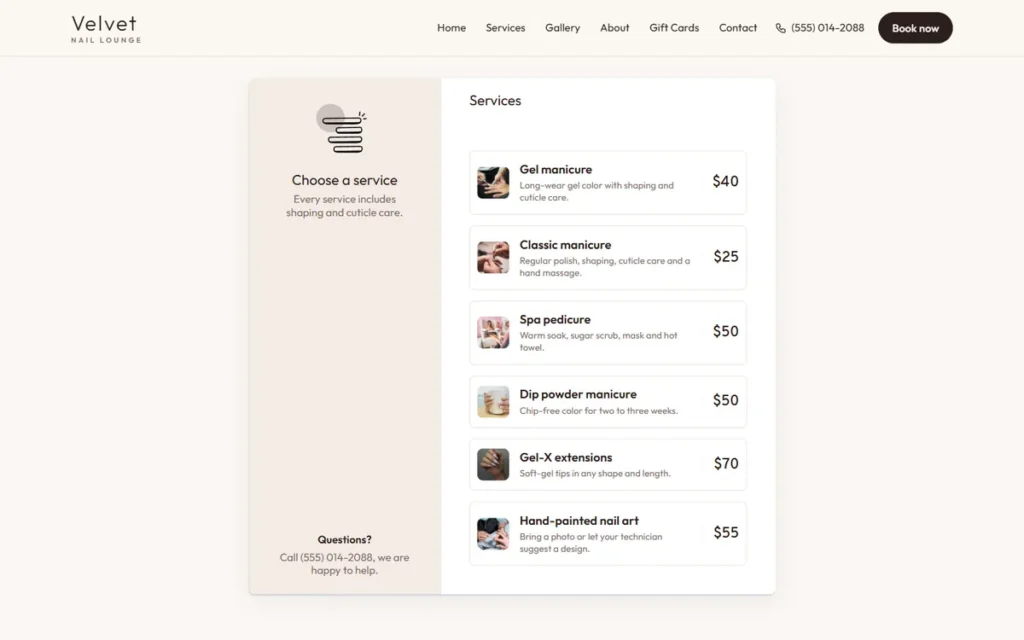
5. Photos and prices on the booking page
Clients choose faster when they see real work and real prices. A booking page without photos looks unfinished.
6. Deposits for long or high-demand services
For two-hour art sets or holiday weekends, a deposit or card on file protects your time. Pair it with a clear salon cancellation policy.
7. Confirmations and reminders
Every booking needs a confirmation. Reminders reduce no-shows; our guide on how to reduce salon no-shows shows how much they help.
8. Walk-in and waitlist handling
The app should let the desk add walk-ins quickly and see real-time availability.
9. Client notes and history
Shape, length, colors, sensitivities and favorite technician, visible at check-in.
10. Easy rescheduling
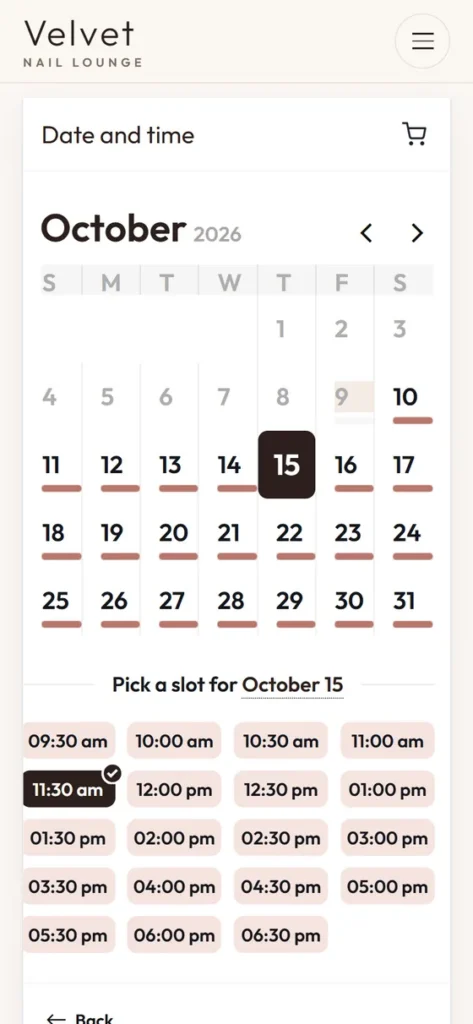
Clients should be able to move their own appointment within your rules, and the desk should be able to drag and drop.
11. Links for Google, Apple Maps and Instagram
The booking link should work everywhere clients find you. Google lets businesses set up bookings through a provider or add a booking link to the Business Profile.
12. Reports the owner actually reads
Bookings by technician, no-show rates, rebooking rates and busiest hours.
Nice-to-have features
These help but should not decide the purchase alone:
- Gift card sales online.
- Memberships and packages.
- Email and text marketing.
- Inventory tracking.
- Payroll and commission tools.
- Multi-location management.
If your POS already does gift cards and reports well, you may not need them in the booking app too.
Run five test bookings before you choose
Ask for a trial or demo and book these appointments yourself, on a phone:
- A gel manicure with removal and two nail art accents for a specific technician on Saturday at 11. Does the time add up correctly?
- An acrylic full set for "any technician". Are only acrylic technicians offered?
- A pedicure for two friends side by side. Can the app book two clients at the same time?
- A late change: move a booked appointment to the next day. Is it simple for the client and the desk?
- A walk-in at 3 p.m. with three technicians busy. Can the desk see who frees up first?
Then ask your front desk lead to do the same. If the app makes any of these painful, keep looking. Note how many taps each booking took and where you hesitated; a client in a hurry will hesitate in the same places, and some of them will give up and call another salon instead.
How booking apps connect to Google
Most new clients find nail salons on Google Maps. Your booking app should make it easy to book from there:
- Booking link: add your booking page link to your Business Profile so clients see a "Book" option.
- Integrated booking through a provider: some providers connect directly with Google; Google's help explains how bookings through a provider work and which providers are available in your region.
- Consistent details: services and prices on your booking page should match what your profile says.
Our guide to the nail salon Google Business Profile covers the rest of the profile.
What booking apps really cost
Pricing models vary. Before choosing, write down:
- Monthly or yearly subscription and what it includes.
- Price per additional technician or calendar.
- Fees per booking or per new client, if any.
- Payment processing rates for deposits and checkout.
- Text message reminder costs.
- Hardware or setup costs.
- Contract length and cancellation terms.
Then compare a realistic monthly total for your salon. A slightly higher subscription with fair processing rates can cost less overall than a cheap app with expensive add-ons.
Marketplace apps vs your own booking page
Some booking apps include a consumer marketplace where clients search for salons. Others give you a booking page under your own brand.
| Marketplace app | Your own booking page | |
|---|---|---|
| New client discovery | Can help, especially for new salons | Comes from your Google profile and social media |
| Competitors on the same screen | Often | Never |
| Your branding | Limited | Full |
| Client relationship | Shared with the platform | Yours |
| Fees | Sometimes per new client | Usually fixed |
Established salons with strong Google profiles often prefer direct booking; new salons may value discovery. Some use both for a while, then move regulars to their own page once the salon has enough reviews and visibility to stand on its own.
When a booking website beats an app
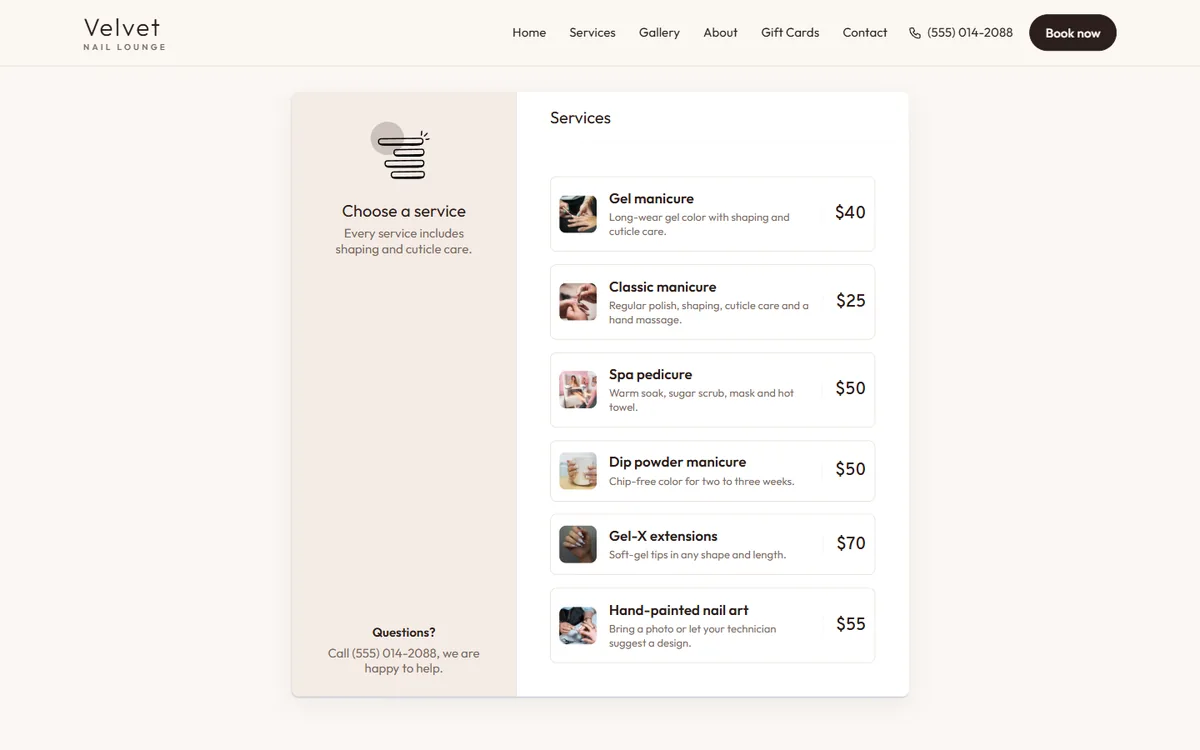
If most clients already find you on Google and Instagram, the simplest setup may be a booking page on your own website: real photos, real prices, booking by service and technician, and an email to the salon for every booking. Dreamer builds booking websites for nail salons that link from Google, Apple Maps and Instagram, and work alongside the POS you already use at the desk. You can preview styles in our website templates.
Booking apps for walk-in heavy salons
If walk-ins are most of your business, online booking is only half the picture. Look for:
- A check-in screen or QR code for walk-ins.
- A live waitlist with estimated wait times.
- A turn system that respects appointments and walk-ins fairly.
- Text updates when a chair opens, sent only to clients who agreed.
Our guides to walk-ins vs appointments and the nail salon turn system explain how to balance both.
Booking apps for solo nail artists
Independent nail artists and suite renters need fewer features but stronger protection of their time:
- Deposits for every new client.
- A waitlist for cancellations.
- A simple portfolio on the booking page.
- Low fixed costs.
- A clean link for Instagram and TikTok bios.
Setting up your booking app well
The best booking app still fails with a bad setup. Spend an afternoon on:
- Service names clients understand: "Gel manicure" instead of "Signature Luxe Gel Experience".
- Accurate durations, measured by your technicians, not guessed.
- Add-on times for removal, length, art and repairs.
- Technician profiles with photos and specialties.
- Rules: how far ahead clients can book, how late they can cancel, which services need a call first.
- Clear policies shown before the client confirms.
What clients expect from a nail salon booking page
Clients compare your booking page with the apps they use every day. They expect:
- Speed: a booking in under a minute, without creating an account first.
- Clarity: service names they understand, with duration and price before they choose.
- Photos: a few real sets for each main service, so they know what they are booking.
- Choice: a specific technician or the first available, whichever they prefer.
- Honesty: add-on prices and deposit rules shown before confirming, not at checkout.
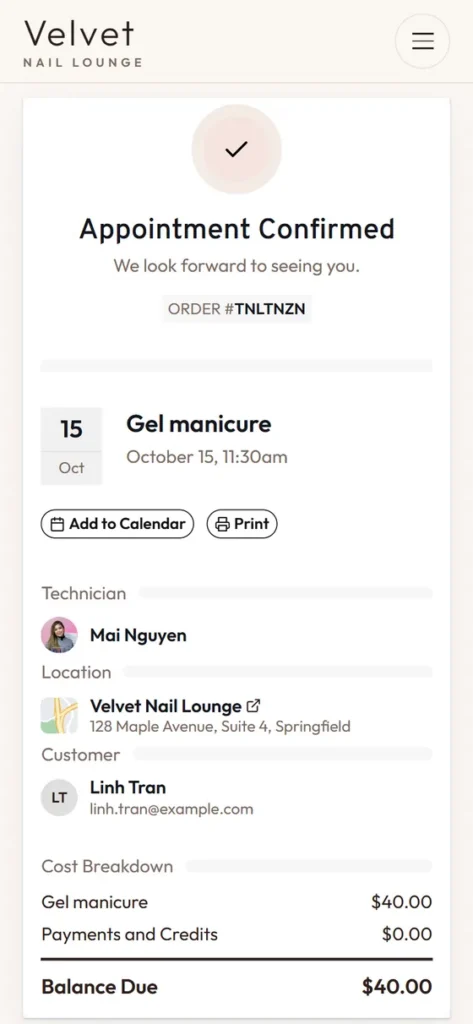
- Confirmation: an immediate message with the date, time, address and how to cancel.
- Easy changes: a link to reschedule within your policy, without a phone call.
If your current booking page fails any of these, clients notice. Some will call instead, which costs your front desk time; others will quietly book a salon whose page feels easier.
Peak days: holidays, prom and weddings
The week before Valentine's Day, Mother's Day or prom tests every booking app. Before peak seasons:
- Open the calendar further ahead for those dates, so regulars can book early.
- Require deposits for long services on peak days only, if you do not use them all year.
- Turn off services that take too long during peak weeks, such as complex hand-painted sets, or offer them only on quieter days.
- Add a short note on the booking page: "Book early for Mother's Day weekend; walk-ins are limited."
- Keep a waitlist ready for cancellations.
Our nail salon holiday marketing guide covers the rest of the season.
Language, accessibility and privacy
Language
Many nail salon teams work in Vietnamese while clients book in English or Spanish. Check whether the staff side of the booking app is comfortable for your team, and whether confirmations look professional in the client's language.
Accessibility
A booking page should work with large text, screen readers and keyboard navigation, with buttons big enough to tap. Clear labels and good contrast help every client, not only those with disabilities.
Privacy
Client names, phone numbers and notes are private information. Choose an app with secure logins for each staff member, limit who can export data, and only send marketing messages to clients who agreed to receive them. Our guide to nail salon text message marketing covers consent.
Introduce online booking to your regulars
Regular clients are used to calling or walking in. Help them switch:
- Tell them at checkout: "You can now book Jenny online, any time, even at night."
- Put a QR code with the booking link at the front desk and on appointment cards.
- Add the link to your Instagram bio, Facebook page and Google profile.
- Send one message to clients who agreed to hear from you, with the link and a one-line how-to.
- Keep answering the phone; some clients will always prefer to call.
Within a few months, many regulars will book online on their own, and the desk will spend less time on the phone during busy hours.
A checklist before you sign up
Tick each item before committing to any booking app:
- Add-ons add time automatically.
- Technicians only show for services they do.
- Deposits can be turned on for chosen services and dates.
- Walk-ins and waitlists are easy for the desk.
- Booking link works on Google, Apple Maps, Instagram and your website.
- You can export clients and appointments yourself.
- Real monthly cost is written down, including processing and messages.
- Contract can be cancelled without large fees.
- The front desk and two technicians tested it and liked it.
If an app fails two or more of these, keep comparing; the time you save during setup is lost many times over in daily frustration.
Train the team on day one
Hold a short training before you go live:
- How to see the day's schedule and today's walk-in queue.
- How to add, move and cancel appointments.
- How to mark no-shows and late arrivals.
- How to add client notes after each service.
- Who answers booking questions from clients.
Measure whether the booking app works
After the first month, look at:
| Measure | Target direction |
|---|---|
| Online bookings per week | Rising |
| No-show rate | Falling |
| Appointments running late | Falling |
| Rebooking at checkout | Rising |
| Time the desk spends on the phone | Falling |
If late appointments rise, durations are wrong. If online bookings stay low, the link is hard to find or the booking page is confusing. Fix one thing at a time and check the numbers again a month later; small adjustments to durations and links often matter more than switching to another app.
Common mistakes
- Choosing by price alone.
- Skipping test bookings with real nail services and add-ons.
- Wrong durations that make every afternoon run late.
- No deposits for long sets on busy days.
- Hiding the booking link instead of putting it on Google, Instagram and the website.
- Not training the team.
Frequently asked questions
What is the best booking app for nail salons?
The best one handles add-ons, technician skills, walk-ins and deposits well for your salon, at a real monthly cost you are comfortable with. Test it with real nail bookings before deciding.
Do nail salons need online booking if they take walk-ins?
Most do. Regulars like booking ahead, and online booking fills slow hours. Keep walk-ins for the rest.
Should a nail salon charge deposits?
For long services, new clients and peak days, many salons do. Explain the policy clearly when clients book.
Can clients book from Google Maps?
Yes. Add your booking link to your Business Profile, or use a provider that connects with Google.
Is a marketplace booking app good for a new salon?
It can help discovery in the beginning. Keep building your own Google profile so clients can find and book you directly.
How long does it take to set up a booking app?
Usually an afternoon for services and staff, plus a few days of testing and training.
The best booking app for nail salons is the one that fits the way your salon really works: add-ons that add time, technicians matched to skills, walk-ins handled smoothly and a booking page that feels like your brand. Test with real bookings, set it up carefully, put the link everywhere and measure the results. The right app quietly fills your chairs while you focus on the nails.